Why Programmers Prefer Codex While Vibe Users Favor Claude
In 2026, AI programming tools have evolved from mere “code completion” to fully autonomous coding solutions. With three leading tools in the market—Cursor, OpenAI Codex, and Claude Code—how do you choose the right one?
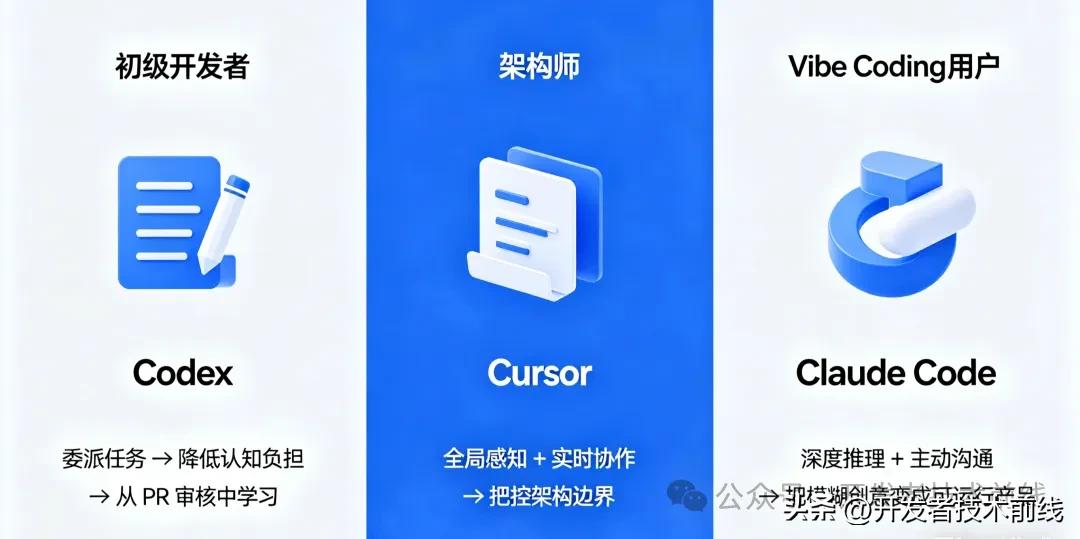
These tools have distinct user bases: beginner programmers often prefer Codex for its efficiency and low cost; experienced developers or architects might lean towards Cursor; while independent developers or those in the “Vibe Coding” community are likely to favor Claude Code.
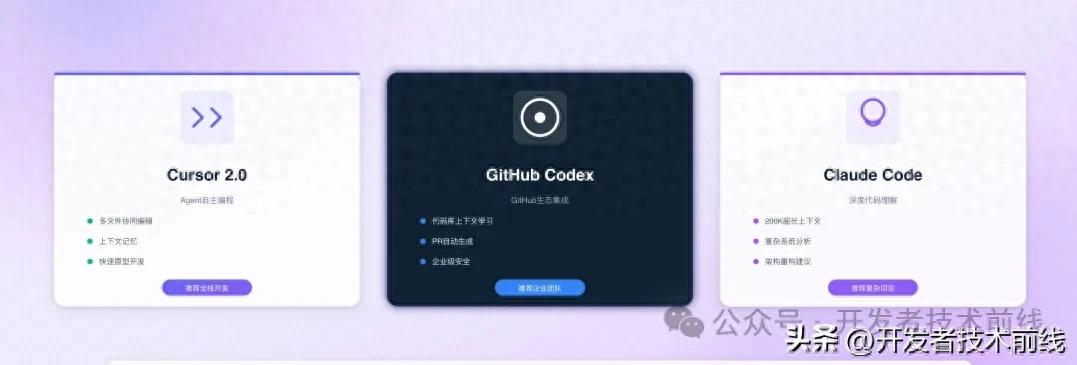
Why Such Different Preferences?
Simply put, beginner developers favor Codex because it acts like a “compliant and efficient intern”—fast, cost-effective, and capable of handling bulk tasks. In contrast, architects choose Cursor, which serves as a collaborative programming partner. Vibe Coding users appreciate Claude Code for its ability to communicate well, understand the bigger picture, and independently tackle complex functionalities.
Features of the Three AI Tools
We will analyze the differences among these three tools based on five dimensions: functionality, experience, performance, pricing, and use cases.
OpenAI Codex: Cloud-Based AI Programming Command Center
Codex’s core philosophy is “delegation”—you assign tasks to it, and it completes them independently for your review.
In February 2026, OpenAI released the Codex desktop app for macOS, a standalone AI programming command center—not a plugin or a web app. Its core capabilities include:
- Multi-Agent Parallelism: Can run up to 10 agents simultaneously, handling different tasks like front-end, testing, and deployment.
- Worktree Isolation: Each agent works in its own Git work copy, preventing interference.
- Skills System: Built-in reusable skill packages for tasks like converting Figma designs to code, project management with Linear, and cloud deployment.
- Automations: Supports scheduled tasks, such as daily test runs and issue classification.
The design goal of Codex is to transform developers from “coders” into “managers”. Sam Altman stated at the launch, “I worked on a big project for days without opening an IDE even once.”
Cursor: AI-Native IDE
Cursor’s core philosophy is “collaborative”—it is not just a VS Code with an AI plugin but an editor reconstructed with AI as its DNA.
Cursor’s advantages include:
- Deep Integration: AI can see everything you see—project structure, terminal output, and debugging information.
- Real-Time Feedback: High accuracy in code completion, allowing quick execution with the Tab key.
- Multi-Model Support: Can switch between models like GPT-5, Claude, and Gemini in the same session.
- Agent Window: Cursor 3.0 features a unified agent workspace that supports running multiple agents locally, in the cloud, and via remote SSH simultaneously.
Cursor is positioned as the “default primary development environment”. Most development time is spent in the editor, where AI assists with editing, browsing, jumping, and instant completion.
Claude Code: Terminal-First AI Coding Assistant
Claude Code’s core philosophy is “supervised coding agent”—it excels in deeply understanding codebases and executing complex reasoning tasks.
Claude Code’s features include:
- Terminal Native: All operations are performed in the command line, with minimal resource usage.
- Deep Reasoning: Achieved an 80.9% success rate in SWE-bench benchmark tests, leading its peers.
- Parallel Sessions: The new desktop app supports running multiple Claude sessions in the same window.
- Routines Feature: Supports automated tasks triggered by schedules, APIs, and GitHub events, even when offline.
The design goal of Claude Code is to act like a seasoned architect, excelling in handling multi-step refactoring, architectural changes, and complex debugging.
Summary Table
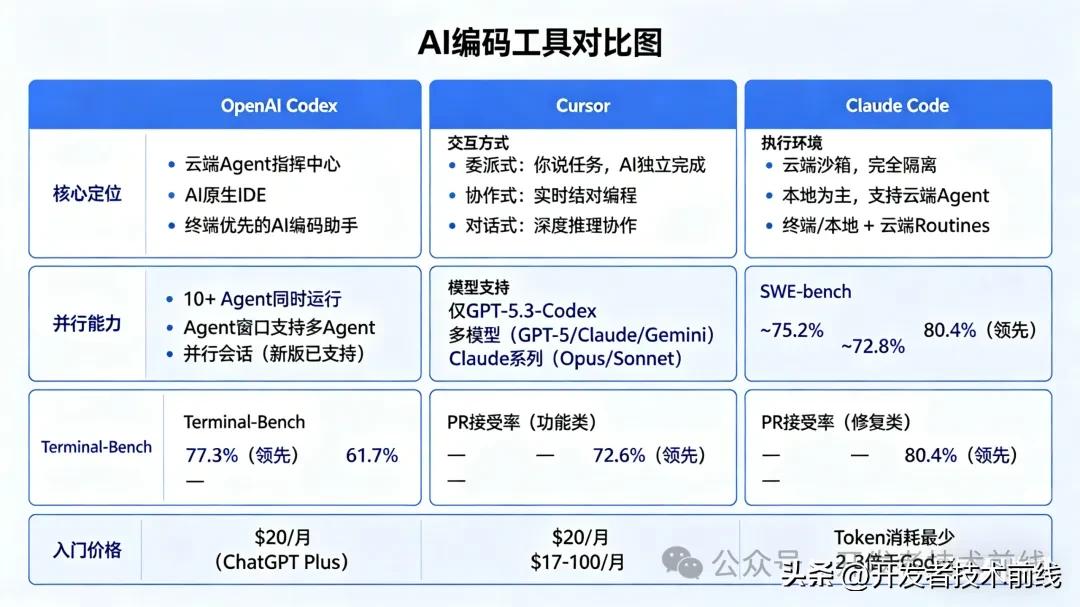
In-Depth Experience Comparison
-
Code Generation Quality and Reasoning Ability Claude Code excels in deep reasoning and complex tasks. In a test to “build a lightweight task scheduler,” Claude delivered a “production-ready” solution with complete documentation, test cases, and error handling, consuming about 235,000 tokens. Codex, on the other hand, is known for its simplicity and efficiency, completing the same task with approximately 72,000 tokens (about three times cheaper than Claude), but lacking detailed documentation. Developers have summarized: Claude Code is like a seasoned engineer (detailed, expensive), while Codex is like a skilled intern (fast, cheap). Cursor’s code quality is average, but thanks to its deep integration, it can enhance generation through a retrieval-augmented generation (RAG) system, often performing more consistently in real projects than pure model scores.
-
Execution Speed and Response Codex has a clear speed advantage, generating tokens at over 240 tokens/s and scoring 77.3% in Terminal-Bench 2.0. Its cloud-based parallel execution allows multiple tasks to run simultaneously without waiting. Cursor has zero network latency during local operations, providing very smooth Tab completion responses. Claude Code is relatively conservative in response speed, but the new desktop app has significantly optimized its parallel capabilities, improving the overall experience.
-
Context Understanding and Project Awareness Cursor has a natural advantage in this dimension. Being directly integrated into the IDE, AI can see the files you are editing, the entire project structure, terminal output, and debugging information. Its RAG system can retrieve rich codebase context from the local file system. Claude Code excels in deep codebase analysis. In tests, it could accurately understand project architecture by searching existing code files and reading base classes, providing code suggestions that align with design patterns. However, its reliability in multi-file editing currently lags behind Cursor. Codex theoretically can obtain complete context by preloading the entire codebase in a cloud sandbox, but the separation from the local IDE makes developers less aware of what AI “sees” compared to Cursor.
-
User Experience and Learning Curve Cursor offers the smoothest experience curve. Based on VS Code, it retains all functionalities and plugin ecosystems, allowing programmers to start with virtually zero learning cost. The visual interface and instant feedback make developers feel that “AI is really helping me think through problems.” Claude Code’s pure terminal design is friendly for command-line-oriented developers, with low resource usage and high focus. However, it presents a higher learning threshold for those who prefer graphical interfaces. Additionally, Claude Code’s image recognition capabilities are notably inferior to Cursor’s, lacking precision in understanding screenshots and design drafts. Codex provides a brand-new macOS desktop application with a simple interface, but users need to adapt to a “delegation” rather than “editing” workflow. Some reviews have pointed out that while Codex’s model is powerful, the user experience still needs improvement.
-
Cost and Value for Money This is the dimension where the differences among the three tools are most pronounced. Codex is the most aggressive in cost control. Completing tasks of equivalent complexity, Codex’s token consumption is about one-third that of Claude Code. ChatGPT Plus users can access it for $20 per month, making it highly cost-effective. Cursor’s pricing strategy sparked controversy in the second half of 2025. The Pro plan shifted from “unlimited” to a quota of 500 uses, later introducing an invisible throttling system. The Pro+ plan at $60/month even removed the description of “unlimited use,” leading to user attrition and a temporary hit to its reputation. Claude Code is the most expensive in terms of token consumption, with a complex task potentially consuming 2-3 times the tokens of Codex. Heavy users may incur monthly costs of $150-200, but its output quality is the highest, making it worth the investment in scenarios requiring deep reasoning.
Use Case Selection
If You Are This Type of Programmer:
Choose Cursor as your main editor and Claude Code as a helper for complex tasks. Cursor’s real-time collaboration and visual feedback are suitable for daily coding; when facing challenges requiring deep refactoring or architectural changes, turn to Claude Code. As one developer put it: “Cursor is the best tool for daily feature development and visual feedback, while Claude Code is better suited for hardcore problems and multi-file refactoring.”
If You Are a Tool Enthusiast Seeking Ultimate Efficiency:
Use Codex as your “AI programming team.” Codex’s multi-agent parallel capability allows you to delegate multiple tasks simultaneously—front-end, testing, and deployment—then take a coffee break and return to review the PRs. This experience of “one person commanding thousands” is currently irreplaceable by other tools.
If You Are a Vibe Coding User or Independent Developer:
Prioritize Claude Code. It excels at extracting key information from vague requirements and providing a “production-ready” complete solution. A journalist with zero programming background built a custom website using Claude Code in a few days, pulling listings from Redfin and calculating walking times—exactly the experience Vibe Coding users need.
If You Are a Team or Enterprise:
Prioritize Cursor’s Enterprise solution. Cursor 3.0 offers self-hosted cloud agents, audit logs, sandbox terminal commands, and management controls, suitable for organizations with strict code security requirements. If you are already in the ChatGPT ecosystem, Codex has the lowest marginal cost, making team adoption easier.
PR Acceptance Rate: Who Is More Trustworthy?
According to a February 2026 academic paper analyzing 7,156 PRs, each tool performs differently across various task types:
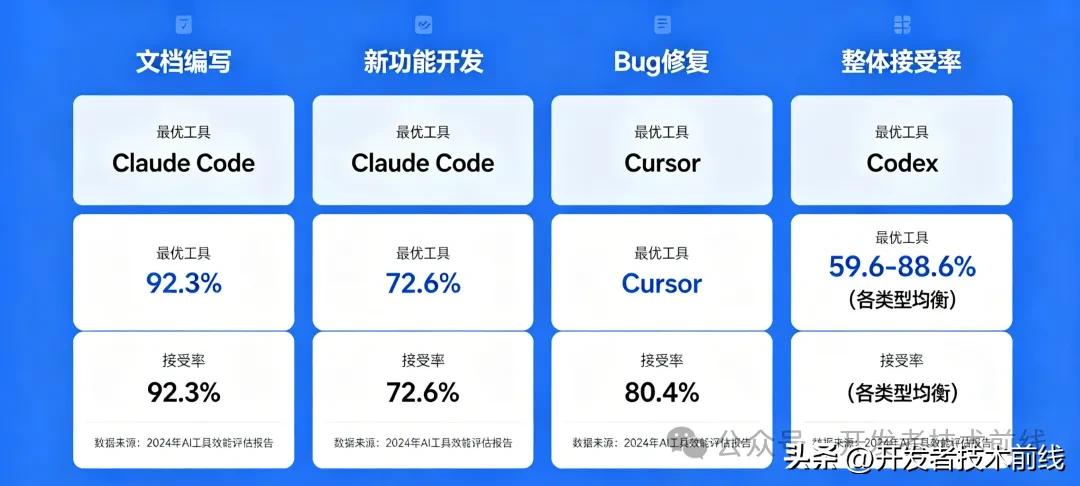
The conclusion is clear: No single tool excels in all tasks—use Claude Code for documentation and feature development, Cursor for bug fixes, and Codex for balanced performance across various tasks.
Notably, in the final merged code requests by developers, Claude Code accounted for 32.1%, while Codex accounted for 24.9%. This indicates that in terms of actual adoption rates, Claude Code currently holds a slight edge.
Final Thoughts
In 2026, AI programming tools are no longer about which model is stronger but rather about which working style suits you best.
- Codex = Delegation → Suitable for automation, parallel, and bulk tasks
- Cursor = Collaborative → Suitable for daily development and real-time feedback
- Claude Code = Conversational → Suitable for deep reasoning and complex refactoring
Real-World Choices: You Can Have Them All
In reality, Codex, Cursor, and Claude Code are not mutually exclusive alternatives. Increasingly, developers are adopting a “dual-holding strategy”—using Cursor as the daily editing environment, Claude Code for complex tasks, and Codex for running bulk automation tasks.
A seasoned developer shared his combined workflow: Claude Code excels at architectural planning and deep reasoning, while Codex handles execution validation and rapid iteration, achieving the best results when used together.
Andrej Karpathy has also proposed a similar “three-layer AI programming structure”: using Cursor for daily simple tasks, Claude Code or Codex for larger functional blocks, and other models for the most stubborn bugs.
True efficiency gains come from flexibly combining different AI tools based on task scenarios.
Don’t get caught up in “who is the strongest.” The truly efficient approach is to switch flexibly according to task scenarios, maximizing the strengths of each tool. The goal of AI tools has never been to replace you but to elevate you to a higher dimension (to outperform colleagues) and build more elegant and robust programs (to save costs for capital).
Comments
Discussion is powered by Giscus (GitHub Discussions). Add
repo,repoID,category, andcategoryIDunder[params.comments.giscus]inhugo.tomlusing the values from the Giscus setup tool.